Input Functions in Python: How to Get Your Code to Talk to You

I'm JMN (Jaffery Mwangi Ndisho), and I'm thrilled to share my passion for data analytics and programming with you. With a background in business and IT, I've always been fascinated by the power of algorithms and their ability to transform data into insights. Through this blog, I hope to share my learning journey and practical knowledge with you, as well as explore new techniques and applications in the field. Join me on this journey and let's discover the world of data analytics and programming together!
In Python, the input() function is used to get input from the user. It prompts the user Input and reads a line. After reading data, it converts it into a string and returns that.
The input() function is a versatile tool that can be used in a variety of ways. For example, you can use it to get a user's name, ask them a question, or get their input on a decision.
How to Use the Input () Function
The basic syntax for the input() function is as follows:
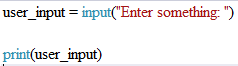
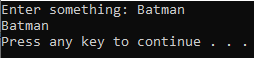
Once the "output window" shows up, type anything that might come to your mind. In this case, let's type a superhero's name like Batman. The output window should print "Batman".
Example
Suppose you are a programmer contracted by a theater. They want you to build a small software to check people's eligibility to watch a movie due to age. Suppose you want to test this software with a movie rated 18+. Let's create a simple program to accomplish this goal.
Step 1
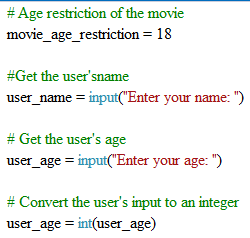
The code begins by creating a variable named movie_age_restriction, representing the age restriction of the movie. In this scenario, the movie is rated 18+.
Step 2
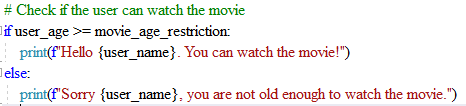
The program utilizes an if statement to check whether a user is eligible to watch the movie based on their age. If the user's age is greater than or equal to the movie's age restriction, the program prints a message stating that they are eligible. Otherwise, it prints a message indicating they are not eligible.
Step 3
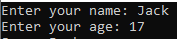
Let's consider a user-persona named "Jack" who is 17 years old. When Jack runs the program, he will be prompted to enter his age.
Step 4
The program informs Jack that he is not old enough to watch the 18+ rated movie.

That's all about Python input functions! Now you're equipped to create interactive programs and receive user inputs like a pro. Just remember, when life gives you user input, always remember to check for those unexpected 'NaNanas' – Non-Ascii Numerical And Non-Alphabetical characters. Happy coding and may your Python journey be filled with laughter and bug-free code! The next article will tackle nested if-else statements. Stay tuned.